
We Don't Replace Receptionists. We Give Them a 24/7 Backup (Real Cost Analysis)
Everyone asks the same question: "Should I hire an AI receptionist or keep my human staff?"
Here's the thing — you're asking the wrong question.
The real question is: How do you make your team more productive without losing the human touch that makes your business special?
Let me tell you about a pest control company that had three full-time receptionists — and was still losing customers every single day.
The Problem Nobody Talks About
Sarah runs a pest control company in Ontario. Good business. Great reviews. Three receptionists working different shifts to cover calls.
But here's what was happening:
During business hours:
- Peak call times = chaos
- All 3 receptionists on other lines
- New calls going straight to voicemail
- Customers hanging up, calling the next company
After hours (5pm-9am):
- Zero coverage
- Emergency pest calls going unanswered
- Competitors scooping up frustrated customers
Sarah calculated she was missing 40-50 calls per week. At an average job value of $450, that's potentially $90,000-$112,500 in lost revenue per month.
But here's what frustrated her most:
"My receptionists are amazing. They know our customers. They handle complex situations beautifully. But I can't ask them to work 24/7. And even with three of them, we can't handle call spikes during summer months."
The Wrong Solution (That Everyone Tries)
Most companies in Sarah's position try one of these:
Option 1: Hire more receptionists
- Cost: $35K-$45K per person annually
- Problem: Still can't cover 24/7
- Problem: More staff = more scheduling headaches
Option 2: Traditional answering service
- Cost: $500-$1,500/month
- Problem: Generic scripts
- Problem: No access to your systems
- Problem: Can't book appointments or qualify leads
Option 3: Do nothing
- Cost: $0 upfront
- Real cost: Lost customers forever
Sarah almost went with Option 1. She was ready to hire a fourth receptionist just for evening coverage.
Then we had a conversation that changed everything.
Our Philosophy: AI as Backup, Not Replacement
Here's what we believe at PulsyAI:
Your receptionists are your frontline. They build relationships. They handle nuance. They ARE your brand.
AI shouldn't replace them. AI should support them.
Think about it like this: When your receptionist goes on lunch break, what happens to calls? Voicemail. When they're helping a customer at the desk? Voicemail. When three calls come in at once? Two go to voicemail.
That voicemail is the problem. Not your receptionist.
How We Actually Implemented It
Here's exactly what we did for Sarah's pest control company:
During Business Hours (9am-5pm)
The phone rings 3-4 times.
- Ring 1-3: Your human receptionist has priority
- If they answer: Perfect, nothing changes
- If they're busy: Ring 4 triggers the AI
The AI picks up before voicemail.
Instead of hearing "Please leave a message," customers get:
"Hi! Thanks for calling [Company Name]. Our team is helping other customers right now, but I can help you! Are you calling about a new service or an existing appointment?"
The AI handles the call professionally:
- Qualifies the lead (residential/commercial, urgency level)
- Books appointments directly into the calendar
- Captures all contact information
- Sends immediate notification to the team
Your receptionist sees everything:
- Email notification with call details
- SMS alert for urgent calls
- Full call transcript and recording
- Lead automatically in CRM
After Hours (5pm-9am, weekends)
Every single call goes to the AI.
No more voicemail. No more "Call back Monday."
Emergency pest situation at 11pm? The AI:
- Captures the details
- Qualifies urgency (wasp nest vs. ants can wait)
- Books next-day appointment
- Sends emergency alert if needed
- Customer feels heard immediately
The Key Difference
3 rings = Human gets it4th ring = AI backs them upAfter hours = AI handles everything
Result? Zero missed calls. Zero frustrated customers. And your receptionists focus on what they do best — building relationships and handling complex situations.
The Real Numbers: What Actually Happened
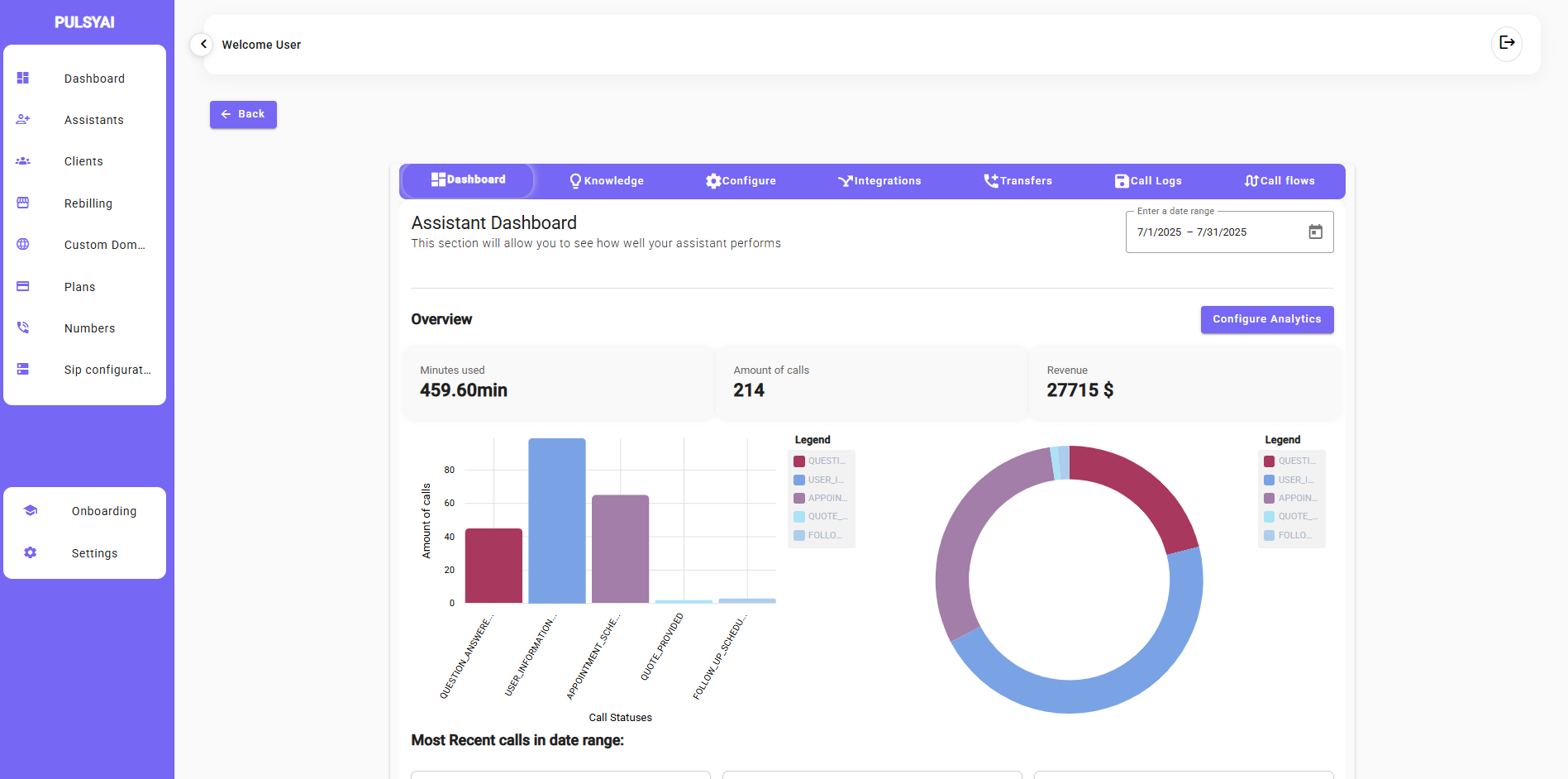
We launched the system in July 2025. Here's the data from the first month:
📊 July 2025 Results
Total calls handled: 214Revenue generated: $27,715Minutes used: 459.60
Call breakdown:
- Customer inquiries: 43 calls
- User information requests: 86 calls
- Appointment bookings: 60 calls
- Quote requests: 18 calls
- Follow-ups: 7 calls
Before vs After
| Metric | BEFORE | AFTER | Difference |
| Missed calls/month | 180-200 | 0 | -100% |
| After-hours bookings | 0 | 67 | +67 bookings |
| Receptionist stress level | "Constantly overwhelmed" | "Actually manageable" | Priceless |
| Customer complaints | 12/month | 1/month | -92% |
| Revenue from AI-answered calls | $0 | $27,715 | +$27,715 |
Cost of the AI system: ~$450/monthROI: 6,159% in first month
What Sarah's Receptionists Said
This is the part that matters most.
Before, I was worried they'd feel replaced. Here's what actually happened:
Maria (Head Receptionist): "Honestly? It's a relief. I used to feel guilty every time a call went to voicemail during lunch. Now I know it's covered. And the AI catches details I might miss when I'm juggling three things at once."
James (Evening shift): "The after-hours coverage is a game-changer. I used to get calls on my personal phone from customers who found my number online. Now they get help immediately, and I get my evenings back."
Lisa (Part-time): "I thought AI meant I'd lose hours. Instead, we're busier than ever because we're not losing customers. I actually got a raise because the company is doing better."
The Cost Breakdown: AI Backup vs. Traditional Options
Let's talk real numbers for a business like Sarah's:
Option 1: Hire Another Receptionist
Annual cost:
- Salary: $38,000
- Benefits: $7,600 (20%)
- Training: $2,000
- Equipment/workspace: $1,500
- Total: $49,100/year
Coverage: Still doesn't solve after-hours. Still doesn't solve call spikes.
Option 2: Traditional Answering Service
Monthly cost: $800-$1,200Annual cost: $9,600-$14,400
Problems:
- Generic scripts
- No system integration
- Can't book appointments
- Poor customer experience
- Additional staff time handling follow-ups
Option 3: PulsyAI Voice AI Backup
Monthly cost: ~$450Annual cost: ~$5,400
What you get:
- 24/7 coverage
- Custom voice trained on YOUR team
- Direct calendar integration
- CRM sync
- Full call transcripts and recordings
- Email/SMS notifications
- Handles 100+ calls simultaneously
- Never takes a sick day
Bonus: Your existing team becomes MORE valuable because they focus on high-value interactions instead of routine calls.
The Three Questions to Ask Yourself
If you're considering voice AI for your business, ask yourself:
1. Are you missing calls?
Even just 5-10 per week adds up. At $200 average job value, that's $4,000-$8,000 monthly.
2. Are your receptionists overwhelmed during peak times?
If they're constantly juggling calls, they can't provide the experience your customers deserve.
3. What happens to your calls after hours?
Your competitors are available 24/7. Are you?
How to Know If This Works for Your Business
This approach works best if:
✅ You have existing reception staff who are good at their jobs
✅ You experience call volume spikes
✅ You want after-hours coverage without night shifts
✅ Your customers need immediate responses
✅ You want to scale without proportional staffing costs
This might NOT be for you if:
❌ Your calls require deep expertise every time
❌ You have fewer than 20 calls per week
❌ Your current voicemail system is working fine
The Future of Reception Work
Here's what I genuinely believe:
Human receptionists aren't going away. They're becoming more important, not less.
But their role is evolving. Instead of being overwhelmed by volume, they're:
- Building deeper customer relationships
- Handling complex situations with nuance
- Training and refining the AI backup
- Focusing on high-value interactions
The AI handles:
- Routine inquiries
- After-hours coverage
- Call overflow during peaks
- First-touch lead capture
- Consistent information delivery
Together, they create something neither could do alone: Perfect coverage with human warmth.
What Happens Next?
If Sarah's story sounds familiar, here's what I'd recommend:
Step 1: Calculate your missed call cost
Take your weekly missed calls × average job value × 4 weeks.That's your monthly opportunity cost.
Step 2: Consider your team
Would your current receptionists benefit from backup? Would they be relieved or threatened?(In our experience, 95% are relieved. The 5% who feel threatened usually come around within a week.)
Step 3: Try it
We typically see ROI within 30 days. If it's not working, you haven't invested years of training into a new hire.
Ready to Give Your Team a 24/7 Backup?
We'd love to show you how this would work specifically for your business.
[Book a 30-minute demo → https://calendly.com/pulsyaiservice/30min]
No sales pitch. Just a real conversation about whether this makes sense for you.
💬 See Real Examples and Ask Questions
Join our Discord community where we share:
- Live call examples from real businesses
- Behind-the-scenes of implementations
- Tips from other business owners
- Direct access to our team
[Join the PulsyAI Community → https://discord.gg/n4MNMNrBgC]
P.S. — Sarah's pest control company just hired their fourth receptionist. But not to answer phones — to handle customer success and retention. Because they're no longer losing customers to missed calls, they're growing faster than they can keep up with. That's a good problem to have.
About PulsyAI: We build voice AI systems that support your team, not replace them. Our philosophy is simple: AI handles the overflow, your people handle the relationships.
Industries we serve: Pest Control, HVAC, Plumbing, Auto Detailing, Real Estate, Medical Offices, and any service business that can't afford to miss calls.
Average results: Zero missed calls, 40-60% increase in after-hours bookings, happier staff, better customer experience.
